Auctions
Knowledge Base Main
Auctions are an exciting way to buy and sell items for Galleons as users try to outbid each other in real time. The Auctions page can be found in the left sidebar under the Economy section. Head over quickly, because the item of your dreams might already be going... going... gone!
- All Auctions
- Auction Details
- Starting an Auction
- My Auctions
- My Bids
- Auction Search
- Auction Tips & Tricks
All Auctions
The All Auctions page allows potential buyers to view all the currently active auctions. By default, the list is sorted by auction end time in ascending order.
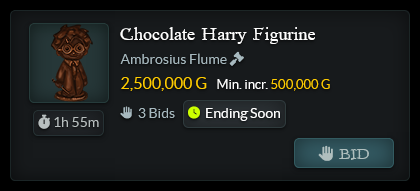
Each auction displayed includes some basic auction info:
- • Name and image of item being auctioned
- • Time remaining on the auction
- • Seller's username and a link to view all their active auctions
- • Next bid price and minimum increment
- • Number of bids placed (NOTE: this will only appear once there is at least one bid.)
Auction Tags
When browsing, you may notice some auctions are tagged with additional information:
- New: This auction began within the last 2 hours.
- Ending Soon: This auction will end within the next 2 hours.
- Leading: You are currently the highest bidder on this auction.
- Outbid: You previously bid on this auction, but another bidder made a higher offer.
Featured Auctions
From time to time, Staff may host a Featured Auction. These appear with a gold border in their own section above all the other active auctions.
Auction Details
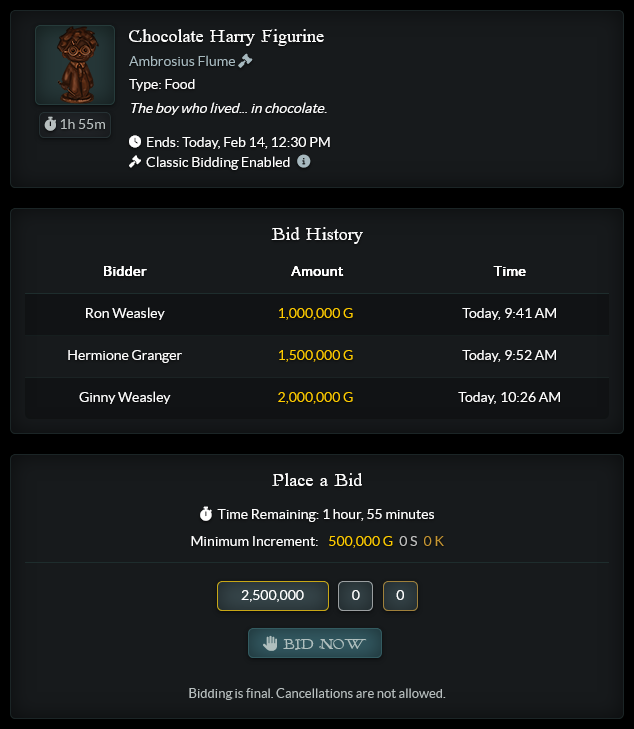
Click on an auction to view its Auction Details. This includes important information like the bidding mode, end date and time, and any messages from the seller.
Bidding Modes
The Bidding Mode for each auction is represented by an icon next to the seller's username:
Classic Bidding: This is the traditional auction format. The auction will end promptly at the listed date and time regardless of what bids have been placed. There are no restrictions on how much bidders can offer.
Extended Bidding: The auction will only end at the listed date and time and if there has not been a bid in the last 60 seconds. Every time another bid is placed with less than 60 seconds remaining, the time remaining will be extended back to 60 seconds. There are no restrictions on how much bidders can offer.
Capped Bidding: The auction will end promptly at the listed date and time, however, bidders may not offer more than five times the listed minimum increment. That means if an auction with capped bidding has a minimum increment of 1 Galleon, no bidder may raise the price by more than 5 Galleons at a time.
Bid History
Bid History shows all bids that have been made on the auction so far. This includes who has bid, what they have bid, and at what time.
Place a Bid
If you have found an item you would like to buy, you can choose to bid on it! This section will automatically give you the the lowest bid possible including the minimum increment. If you want to bid higher, type in the amount you would like to bid manually. The bid amount field will accept both K, M, and B as shorthand for a thousand, a million, and a billion respectively. For example, bidding 1K will bid 1,000 Galleons, bidding 1M will bid 1,000,000 Galleons, and bidding 1B will bid 1,000,000,000 Galleons.
Keep in mind that you cannot bid again if you already have the highest bid, and you cannot bid on your own auctions.
All bids are final. You cannot cancel a bid you have made under any circumstances, so before you click, make absolutely sure you are only bidding the amount you are willing to pay.
Starting an Auction
To set up an auction, click the item you want to auction in your inventory and choose "Put up for Auction." There are several options to customize your auction.
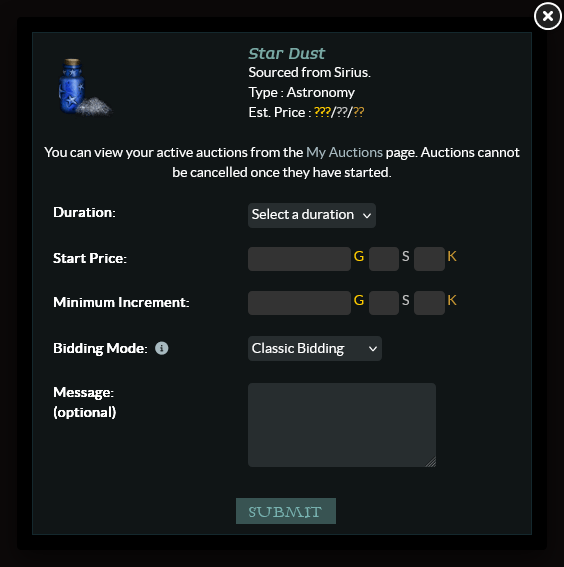
Duration: This is the time your auction will last. Pick one of the time periods in the drop down menu.
Start Price: This is the price your auction will start at. If you pick a start price at 2,000 Galleons, a user will have to bid at least 2,000 Galleons + your minimum increment.
Minimum Increment: This is the minimum amount someone would have to bid over the price of your auction. For example if you were selling a Polyjuice Potion priced at 2,000 Galleons with a minimum increment of 50 Galleons, a user would have to bid at least 2,050 Galleons, and the next user would have to bid at least 50 Galleons more than that.
Bidding Mode: Use the dropdown to choose between Classic Bidding, Extended Bidding, and Capped Bidding. For more details about what each bidding mode entails, see "Bidding Modes" under Auction Details above.
Message (optional): Here you can choose to put any message of cheer or information to users about your item.
Starting an auction is final! You cannot cancel an auction once it is started under any circumstances, so before you click, make absolutely sure you have chosen an item you actually want to auction. You cannot bid on your own auctions.
If someone has bid by the time the auction ends, you will receive a notification with the winner and the final number of Galleons you will receive for your item. If no one bids on your auction, you will receive a notification saying that your auction has ended with no winner, and the item will be returned to your inventory. This process happens automatically and may occasionally experience a small delay, so don't panic if it takes a few minutes after the auction ends!
Each user can host a maximum of 10 auctions at a time, so if you already have 10 auctions ongoing, you need to wait for one of them to finish before you can start another.
My Auctions
This section shows any currently active auctions you have started.
My Past Auctions
This section shows any auctions you have started that ended in the last 7 days.
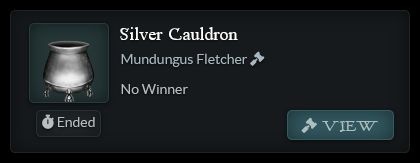
Past auctions will be marked with one of two possible outcomes:
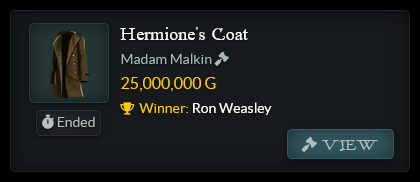
- Winner shows who won the auction and how much they paid
- No Winner means no one bid on the auction. Better luck next time!
My Bids
This section shows any bids you have made on currently active auctions. Auctions will be marked with one of two tags:
- Leading means you currently have the highest bid on the auction.
- Outbid means someone else has placed a higher bid than you on the auction. Get back in there!
My Past Bids
This section shows auctions you bid on that have ended in the last 7 days. You will see a Winner message in gold for the auctions you won. (Congrats!)
Auction Search
You can search auctions either by item or by username.
Search by Item
Item searches must contain at least 2 characters. If multiple items match your search, up to 12 will be presented to choose from. If more than 12 items match your search criteria, you will be asked to narrow your search. Click on any of the suggested items to filter your results to that item specifically.
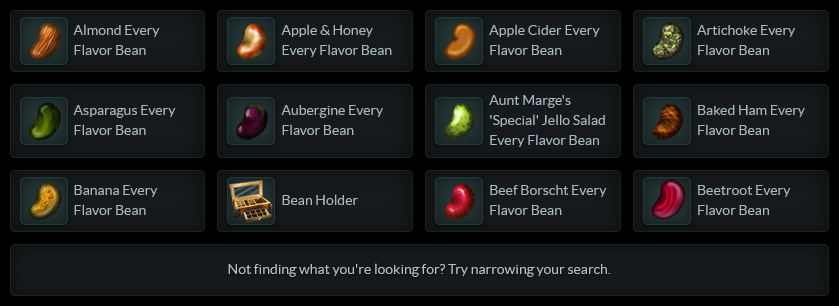
Active Auctions shows currently active auctions for the searched item. Past Auctions shows up to 20 auctions for the item that have ended.
Search by Username
Username searches must match username exactly, including any spaces or underscores.
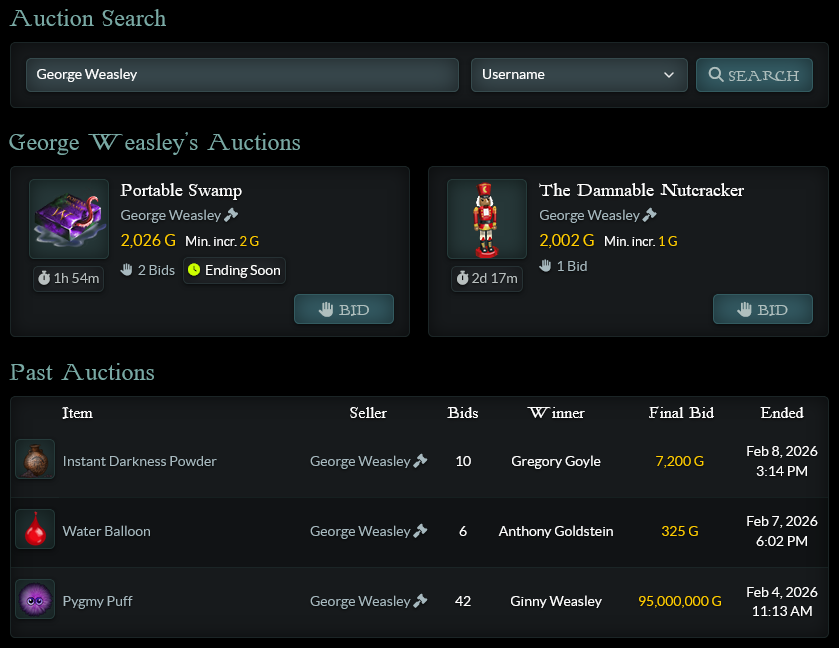
The first list of auctions shows currently active auctions started by the user. Past Auctions shows any of their auctions that have already ended, up to 20 per page.
Auction Tips & Tricks
- • Check Owl Search before you bid on an item in auctions, to make sure you cannot buy the item cheaper in a user store. Similarly, it's always worth Owl Searching an item before starting an auction to decide the starting bid.
- • Remember some event-specific items will be deleted at the end of the event, so make sure to check the event guide before bidding on them. When auctioning event-specific items, make sure to plan the end time accordingly.
- • If you plan to auction multiple items at once, keep in mind that you can only have a maximum of 10 active auctions at a time.
- • Longer auctions are more likely to be successful than shorter ones. Give bidders enough time to find your auction and get their Galleons ready!
- • You can promote your auction in the Economic Transactions Advertisement Board thread in Diagon Alley, but make sure to read the rules in the first post before you do!
- • Starting and bidding on an auction are both FINAL. You may not cancel a bid or an auction once it has begun, so make sure to check everything carefully before you click!
Do you still have questions?
Please be as descriptive as possible, and a WC mod will get back to you as soon as possible.